
Joe Wolski, CTO

Feature-Sliced Design: A Guide To Scalable Frontend Architecture


Feature-Sliced Design is an architectural methodology for scaffolding front-end applications. Simply put, it’s a compilation of rules and conventions on organising code. The main purpose of this methodology is to make the project more understandable and structured in the face of ever-changing business requirements.

This is what the official documentation of the methodology immediately explains to us. This article clearly explains what FSD is about.
Nowadays web applications are becoming more complex and large-scale, functionality is growing, more developers are joining projects, and code organisation is becoming critical. Then there is an urgent need for a reliable and efficient way to manage complexity.
Feature-Sliced Design is an architectural methodology focused on scaling projects by splitting the application into independent and logically justified layers and modules. Approach helps establish a clear, scalable structure that minimizes dependencies and improves maintainability.
The methodology identifies three key concepts:
Let’s break down each one in more detail.
Layers consist of six divisions standardised by methodology in hierarchical order from top to bottom, which means that according to the methodology it allows to reuse the functionality from the lower divisions in the divisions located above. The layers are:
The documentation says:
You don’t have to use all the layers, but their names are important.
But why do they say that? From personal experience of working with this methodology, it makes a lot of sense and can really help ease the process of diving into development with Feature-Sliced Design. At first, you may face difficulties in determining which functionality belongs in which layer, which can slow down development and, if not done correctly, lead to technical debt that’ll force you to refactor later. So, I’d recommend starting with just the App, Pages, Entities, and Shared layers for a smoother introduction. That way, you won’t get overwhelmed with too many layers at once. But of course, if you’re comfortable with the principles from the start, it’s possible to implement all the layers right away.
Now, here’s the thing: Ideally, Feature-Sliced Design works best when you’re using all layers from the get-go, but let’s be real – it’s not always necessary to do so right at the start. Let’s define what each layer is responsible for.
App Layer should always be your starting point. It contains everything that makes the app run – the entry point, routing, providers, etc. This is the foundation, the first thing you build out in any project.
After the App layer comes Pages. This is where you define the actual pages of your application, assembled from the layers beneath it and the code inside the pages themselves. It’s also where you should put templates and layouts, helping you structure the layout of the app.
So, what do we build our pages out of? This is where Widgets come in. A Widget is a large self-contained chunk of functionality or UI, usually serving an entire use case. For example, imagine a login form with username, password fields, and a submit button — that’s a widget. It might include everything from form validation to creating a user session after successful login, or it could simply serve as a UI template, where logic is added later. It really depends on your needs and your creativity.
The Features layer is for reusable business logic – entire product features that provide value to the user. For example, authorization is a feature that can be reused in a widget (like in the login form mentioned earlier). The idea is that these features are independent and reusable across different parts of the app.
The Entities layer is where you define the core data models that your app works with. For example, in the case of authorisation, this might be the User entity. This layer defines the key data structures and models that are used throughout the app.
And last, but certainly not least, we have the Shared layer. This layer contains reusable functionality that’s detached from specific business logic — think of it as a common repository for utility functions, UI components, styles, and assets that can be used across different parts of the application. It can easily become a “catch-all” if not organised carefully, but when done right, it’s a treasure trove of reusable pieces that make your development process more efficient.
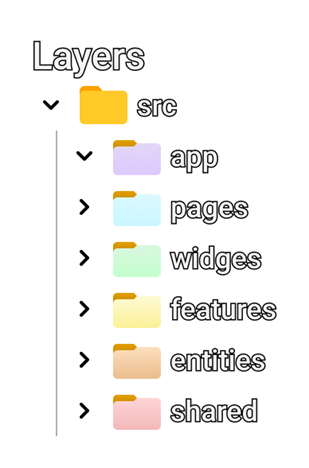
But in my personal experience, this layer is both a headache, if you don’t think about it in time, and a treasure, where we store, for example, elements of our UI-kit, a huge number of assets and various methods that we reuse in each of the layers above. Going back to our authorisation example again, this is where we will store the button and input fields.
The bottom line is that Feature-Sliced Design gives you the flexibility to scale your architecture as the project grows. You don’t have to implement all the layers right away, especially for smaller projects or MVPs. Starting with the basics (App, Pages, Widgets, and Shared) gives you a solid foundation, and then you can gradually add the more complex layers like Features and Entities when your project is ready for them. The goal is to balance ease of development with long-term maintainability, and FSD helps you do that — if you stick to the principles over time.
Next up are Slices, as documentation says — let’s describe them. They separate our codebase by business domain. You’re free to choose any names for them and create as many as you wish. Slices make your codebase easier to navigate by keeping logically related modules close together. One rule you must follow is — Slices cannot use other slices on the same layer, and that helps with high cohesion and low coupling.
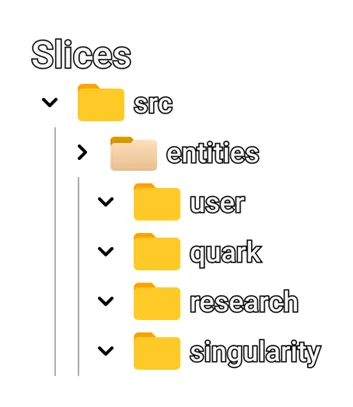
This strict separation encourages each slice to be self-sufficient and responsible only for its own business logic. For example, a User slice might contain everything related to user profiles, authentication, and permissions — all encapsulated and unaware of what’s happening inside, say, an order slice. This minimizes side effects, reduces interdependencies, and makes refactoring or onboarding significantly easier.
Moreover, slices align well with scalable team structures. Different teams can own different slices, confidently developing features in parallel without stepping on each other’s toes. This natural modularity not only supports clear ownership but also improves testability, as each slice becomes a bounded context that can be tested in isolation.
Slices, as well as layers App and Shared, consist of Segments, and segments group your code by its purpose. Segment names are not constrained by the standard, but there are several conventional names for the most common purposes:
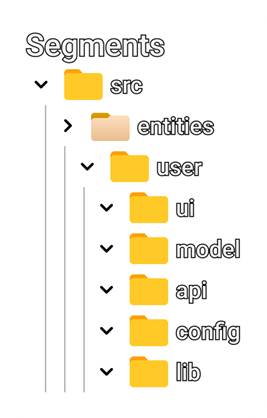
Usually, these segments are enough for most layers, you would only create your own segments in Shared or App, but this is not a rule.
So, what is the essence of this concept? It is that we gain certain advantages by following this hierarchy and rules:
Feature-Sliced Design is a scalable, modular, and maintainable architectural approach that organises applications based on features, rather than technical layers, which means instead of having separate folders or modules for components, services, and APIs, each slice includes all these aspects within a single feature. By breaking down the code into Layers, Slices, and Segments, FSD ensures:
While FSD offers a powerful framework for scaling frontend applications, it’s not a silver bullet. A few points to keep in mind:
Principles are often violated: Even the maintainers of FSD sometimes break their own rules for the sake of practicality. In larger applications, the strict separation of layers and slices can sometimes lead to unnecessary complexity, and some flexibility is often required.
Real-world complexity: As projects grow, the boundaries between slices or features can blur. Enforcing strict separations may not always make sense, especially when complex cross-feature communication is required.
Adoption challenges: Implementing FSD in an existing project or a smaller team might seem overwhelming, and the upfront effort to define layers and slices may not be worth it unless the project is large enough to justify it.
By following FSD principles, teams can build flexible, efficient, and maintainable applications that are easier to develop, extend, and refactor over time. If you’re working on a growing frontend project, FSD is worth considering as your possible architectural foundation.


Joe Wolski, CTO





Sr. JavaScript Software Engineer Robert Oleksza
