
AI Insights
Creating Cypress API Tests Using AI and OpenAPI Documentation


As APIs grow in complexity and scale, ensuring their quality and reliability through testing becomes crucial. While manual test writing is time-consuming and error-prone, recent advances in AI-assisted development offer a powerful alternative. By combining Cypress for API testing, OpenAPI for formal API documentation, and Claude 3.7 or 4 Sonnet for intelligent code generation, developers can automate API test creation with high precision and minimal effort.
This article guides you through the process of using Claude AI models to generate robust, real-world Cypress tests directly from your OpenAPI specifications.
Why combine AI, OpenAPI, and Cypress?
The Problem is the following
Traditional API testing involves manually inspecting API documentation and writing test cases line by line. This process is redundant and time-consuming, prone to human errors, and hard to scale as the API evolves.
What is the solution?
Using OpenAPI as a machine-readable contract, we can prompt AI models like Claude 3.7 or 4 Sonnet to generate accurate Cypress test code. This method ensures high-quality, maintainable tests, faster onboarding for new services, and alignment between documentation and implementation.
What type and level of tests are generated?
This solution focuses on integration-level API tests using HTTP requests. Specifically, the tests generated by Claude or other AI models via OpenAPI are the following:
Test Level: API-layer tests (between frontend/backend or service-to-service), not full end-to-end (E2E), but higher than unit tests.
Test Types:
• Positive flow tests: Validate correct behaviour (e.g., GET /users returns 200 OK with expected fields).
• Negative tests (optional): Can also be generated to cover 400, 401, 404 responses.
Contract-based validation: Ensures the response structure matches the OpenAPI schema.
• Approach: black-box tests that rely solely on the OpenAPI specification – no internal code knowledge required. They simulate real consumer behaviour against your live (or stubbed) API.
Prerequisites
To follow along, you’ll need:
• A complete OpenAPI 3.0+ specification (JSON or YAML);
• Access to Claude 3.7 or 4 Sonnet via Anthropic’s API, web UI, or GitHub Copilot;
• A Cypress test project initialised (npm install cypress);
• Node.js for scripting (optional).
Enhanced Prompt for Claude 3.7/4 Sonnet
The core of this approach is a well-crafted prompt. Claude models are excellent at structured generation, so this prompt guides the model with precision:
You are an expert software engineer focused on automated API testing. You are given an OpenAPI 3.0 specification. Your task is to generate Cypress API test code for all listed endpoints.
For each endpoint, do the following:
• Create a `describe` block named after the endpoint’s operation summary or path;
• Generate one or more `it` blocks for the main use case, using appropriate HTTP methods and paths;
• Use realistic request data based on the schema definitions;
• Validate status codes, response shape, and key fields (e.g. `id`, `name`);
• Include `cy.request()` and `expect()` assertions using Chai;
• Handle dynamic path parameters using template literals;
• Handle authentication if required via headers;
• Use TypeScript syntax for Cypress if available.
Do not include placeholder comments – generate concrete test cases based on the spec. If a response schema is defined, use it to validate fields and types. Here is the OpenAPI spec:—<INSERT_OPENAPI_JSON_OR_YAML_HERE>
You can paste your OpenAPI spec in place of the placeholder to get a full set of tests.
Example input & output
Given OpenAPI Snippet:
paths:/users/{id}:get:summary: Get a user by IDparameters:- name: idin: pathrequired: trueschema:type: stringresponses:’200′:description: Successful responsecontent:application/json:schema:type: objectproperties:id:type: stringname:type: string
AI-Generated Test (TypeScript):
describe(‘Get a user by ID’, () => { it(‘should return 200 and user object’, () => { const userId = ‘123’; cy.request(`/users/${userId}`).then((response) => { expect(response.status).to.eq(200); expect(response.body).to.have.property(‘id’, userId); expect(response.body).to.have.property(‘name’).and.be.a(‘string’); }); });});
Claude interprets the spec, identifies input parameters, expected response structure, and writes a complete test in idiomatic Cypress style.
Claude 4 Sonnet In GitHub Copilot
With Claude 4 Sonnet now available via GitHub Copilot, the process becomes even more powerful. It improved structure recognition (Claude 4 better understands complex nested schemas, dependencies, and OpenAPI nuances). It generates cleaner, more structured test code that includes edge cases, validation logic, and dynamic data handling. You can use Claude inline in your IDE through Copilot, generating and editing tests without leaving your workspace.
This brings the AI experience even closer to your dev flow.
How well does this approach scale?
This method is designed to scale with real-world API ecosystems. Here’s how it performs across key dimensions:
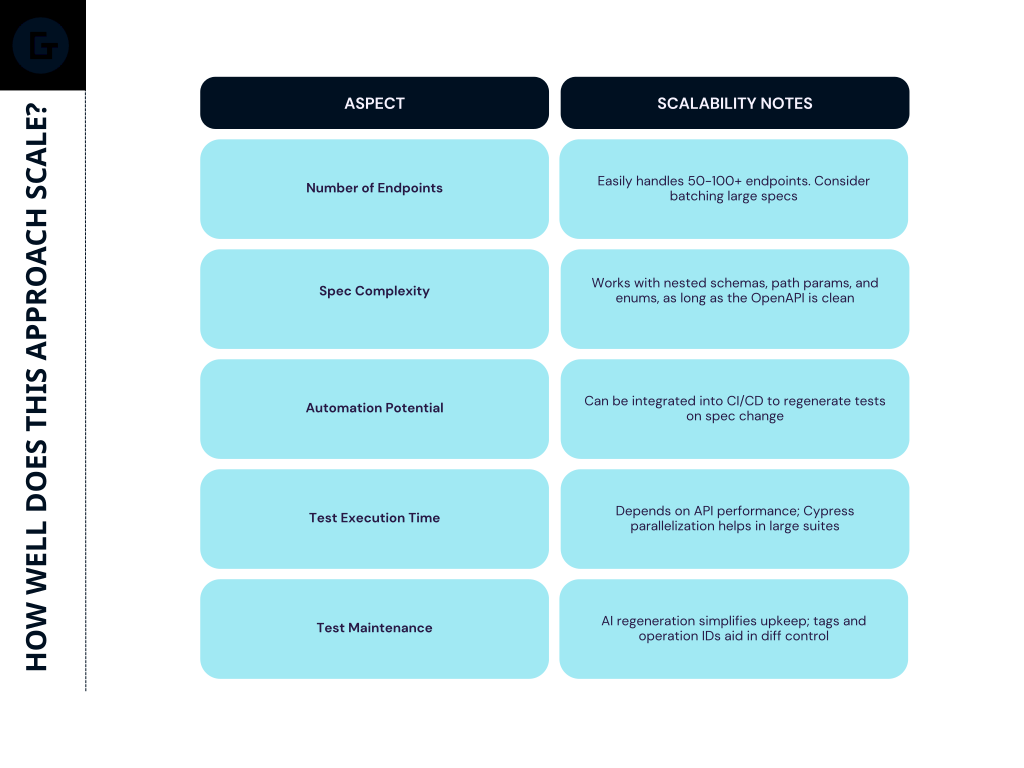
For even better scale, maintain modular specs (using $ref), and generate tests by tag (e.g. users, auth, admin) to organise files and execution order.
Final Thoughts
Using Claude 3.7 or 4 Sonnet to generate Cypress API tests from OpenAPI specs is not just a productivity booster – It’s a scalable, intelligent QA strategy. With a well-structured spec, you can ensure every endpoint is tested consistently, every update is reflected in real tests, and every test fits directly into your CI/CD workflow. AI doesn’t replace your QA engineers – It empowers them to move faster, focus on edge cases, and build quality from day one.
Ivan Tkachou, Senior SDET
Posted 26 Jun 2025


Read more AI Insights
-

-
Learn more
Godel accelerating digital delivery with Awaze ahead of peak demand
-
Lead Java Software Engineer, Siarhei Dvaradkin
Learn moreChange Propagation: SDD’s Central Unsolved Challenge
-
Siarhei Oshyn, Head of Data / Data & AI Architect
Learn moreWhat LLM will be the best choice for your business?
-
Valdemaras Girštautas, Jr, JavaScript Software Engineer
Learn morePrompt Context Types: Key Experimental Findings
-
Learn more
Godel helps Welbeck Health turn AI ambition into action