
Lead Java Software Engineer, Siarhei Dvaradkin

Visual Regression Testing: Spot the Difference


In the world of software development, user experience is everything. And when it comes to ensuring a flawless, bug-free interface, visual regression testing (VRT) stands out as a crucial tool for developers. Imagine rolling out an update to your app only to discover that certain UI elements no longer look or function as they should – this is where VRT comes into play. By automatically comparing before-and-after screenshots, VRT helps developers spot unintended visual changes, catch bugs early, and maintain a smooth, consistent user experience. Let’s dive into the essential aspects of VRT, the tools available, and how it can help you avoid costly UI mistakes.
Visual regression testing ensures your app’s UI remains consistent after updates or code changes. It works by taking before-and-after screenshots and comparing them to detect unintended differences. This helps developers catch visual bugs early, ensuring a smooth user experience and a polished interface.
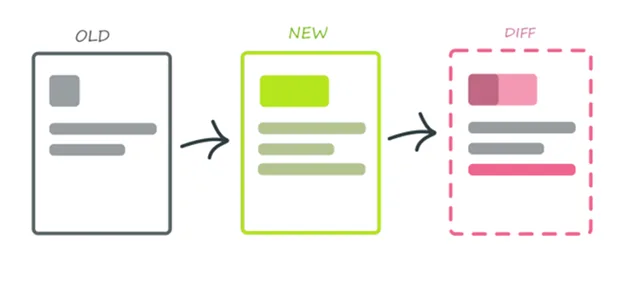
Studies from BrowserStack and Applitools show that automated visual regression testing catches 90% of visual bugs, depending on complexity and testing methods. Key issues it helps avoid:
1. Unexpected UI changes – Detects unintended modifications after deployments.
2. Broken layouts – Identifies misaligned or overlapping elements.
3. Missing elements – Ensures UI components render correctly.
4. Styling errors – Flags inconsistencies in fonts, colors, and styles.
5. Cross-browser issues – Helps maintain a consistent look across different browsers and devices.
By addressing these problems early, VRT enhances user experience and prevents frustration.
There are two main approaches:
1. Testing components in Storybook – Storybook allows you to isolate UI components, take snapshots, and detect visual changes before merging them into the app.
2. Testing full pages – Screenshots of entire pages ensure that all components work together without breaking layouts or styles.
A combination of both provides the best coverage for detecting visual regressions.
Best Tools for Visual Regression Testing
Chromatic automates visual testing for Storybook components and pages. It runs tests in the cloud, ensuring fast, pixel-perfect comparisons across browsers.
✅ Pros:
❌ Cons:
Percy captures screenshots, compares them against a baseline, and highlights differences, integrating smoothly into CI/CD workflows.
✅ Pros:
❌ Cons:
Percy is great for teams needing robust cross-browser testing, but it may take time to integrate fully.
Both Cypress and Playwright offer end-to-end (E2E) testing with visual regression capabilities.
✅ Pros:
❌ Cons:
These tools are ideal for teams already using Cypress or Playwright for E2E testing.
Loki specializes in Storybook-based testing, running UI tests headlessly in Docker.
✅ Pros:
❌ Cons:
Loki is an efficient option for Storybook projects, but not as versatile for full-page testing.
Each tool fits different needs. Here’s a quick guide:
✅ When to Use It
✔ Frequent UI changes – Ideal for projects with rapid iterations.
✔ User-driven applications – Essential for polished, interactive UIs.
✔ Cross-browser compatibility – Ensures consistency across devices.
✔ Large teams / Shared UI libraries – Prevents UI conflicts across multiple teams.
❌ When Not to Use It
✘ Static applications – If the UI rarely changes, VRT may not be worth the effort.
✘ Limited resources – Small teams may find setup and maintenance too demanding.


Lead Java Software Engineer, Siarhei Dvaradkin

Siarhei Oshyn, Head of Data / Data & AI Architect

Valdemaras Girštautas, Jr, JavaScript Software Engineer